
T-Mobile Visual Voicemail
T-Mobile USACommunication
3.140.33K Reviews
- Version
- 10.7.0.784475
- Installs
- 100.00M
- Age Rating
- Everyone
Screenshots

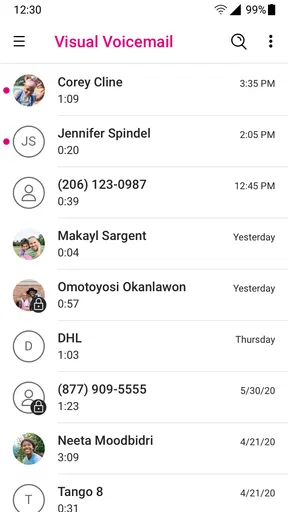
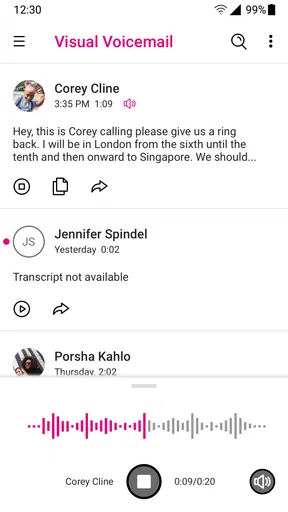
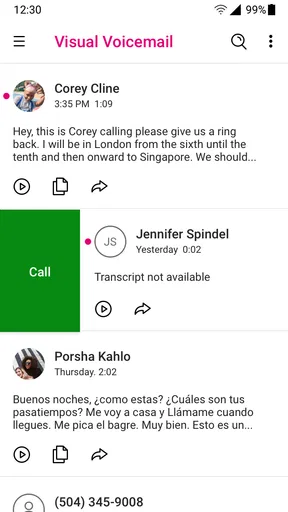
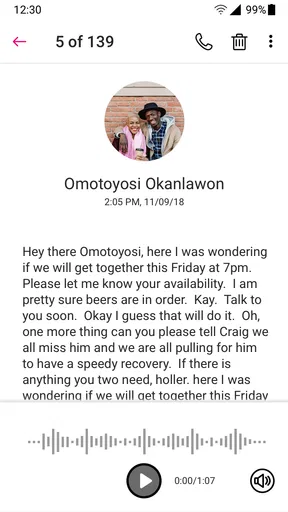
Our Review of T-Mobile Visual Voicemail
 Analysis by Appyee
In a shared household, missed calls rarely matter to just one person. A delivery driver may leave a message while someone is out, or a relative may call while the phone’s owner is busy. I like the idea of being able to check voicemail from a message list rather than repeatedly dialing in, but this app works best when everyone is clear about whose phone number and voicemail they are using. T-Mobile Visual Voicemail is a communication app from T-Mobile USA, and its practical value is tied to that T-Mobile connection.
One phone, one voicemail inbox
Picture a parent cooking dinner while a school or appointment call comes in. They can glance at the voicemail list later, read a transcription when that is more convenient, and listen to the recording if the wording matters. That can make routine coordination easier without asking another household member to answer or return the call on the owner’s behalf.
That distinction matters: this is a way to manage the voicemail associated with the T-Mobile line, not a shared household message board. I would not treat it as a place where family members can automatically pool messages or assign tasks. If several people need to coordinate, the owner can choose to share a particular voicemail through email or a messaging app, but that is a deliberate handoff rather than a built-in family workflow.
Setup depends on the line owner
In my experience, the setup is most straightforward when the person installing the app is also the person who uses the T-Mobile account and phone line. The original experience involved logging in and syncing voicemail; that makes account boundaries worth thinking through before putting the app on a shared device. A household member should not assume that having the phone in hand means they should sign in with someone else’s account.
If a family member helps with setup, I’d keep the account holder involved and make sure the app is being configured for the intended line. That avoids confusion about whose messages appear and who is responsible for protecting access. On a phone that changes hands, I would also check that the right person is signed in before relying on it for private or time-sensitive messages.
The app is free, and it is listed for Everyone. Those details make it easy to consider for ordinary household use, but an age label is not a substitute for an adult deciding whether a child should see an adult’s voicemail. For younger users, I would keep the line and account under the appropriate adult’s control instead of treating the app as a parental-monitoring tool. It is for handling voicemail, not for managing family permissions.
Making voicemail easier to handle day to day
The main advantage I noticed is that the app changes the order of work. With traditional voicemail, you often call in and listen through messages to find the one you need. A visual list gives you a quicker way to scan what is waiting, while transcription can help you decide which messages deserve a full listen. That is useful when you are commuting as a passenger, between appointments, or in a place where playing audio would be awkward.
Transcription is a convenience, not a perfect record. Background noise, accents, or a name that the system does not recognize can lead to mistakes. My rule would be to use the text to triage, then listen to the original before acting on anything consequential: a changed appointment time, a phone number, a payment detail, or instructions that need to be followed precisely. That small check prevents a readable but inaccurate transcription from becoming the source of an avoidable mix-up.
Saving a voicemail is useful when a message has lasting value, such as a personal greeting or details you may need again. Sharing can also help when the message itself needs to reach someone else. I would still think before forwarding: voicemails can contain private information, and sending one outside the original inbox changes who can hear it. For simple household coordination, a short summary may be enough; when exact wording matters, sharing the recording can be more useful.
What it does better than dialing in
Compared with ordinary dial-in voicemail, the visual approach reduces the need to listen in sequence just to locate a particular message. It also gives you a practical option when sound is inconvenient. That is the app’s clearest strength: it makes the voicemail inbox easier to scan and gives you more control over when to listen.
It is not a replacement for every communication tool. If a caller can text, a text may be faster to search and answer. If you need a live conversation, a callback is still the direct solution. And if you need voicemail from a non-T-Mobile line in one unified inbox, this app is not the right fit; its usefulness is for T-Mobile voicemail rather than a carrier-independent service.
There is also a meaningful difference between sharing a saved message and forwarding calls to another number. The app can share voicemails through email or messaging apps, but it does not provide voicemail forwarding to other numbers. Someone who regularly redirects calls for work or caregiving should check whether their existing phone or carrier arrangements meet that need rather than expecting this app to handle it.
Small habits that prevent mix-ups
For a busy household, I would make voicemail checks part of a simple routine: the line owner reviews messages, listens to anything that seems urgent or unclear, and then passes along only the information another person needs. This keeps the app useful without turning one person’s inbox into an informal group account. It also reduces the chance that two people assume the other has responded to a caller.
When a message contains a time, address, or callback number, I would verify it against the audio before putting it into a calendar or sending it to someone else. Transcription can save time, but a quick listen is the safer step when one misheard word could change the plan. If you save a message for later, decide whether you genuinely need the recording; keeping only the essential details elsewhere can be simpler for routine reminders.
Before relying on the app for an important call, I would also check that the expected voicemail appears and that the phone is using the correct T-Mobile line. That is especially sensible after a device or account change. The app can make messages easier to review, but it does not remove the need to confirm that the right inbox is being checked.
Who will appreciate it—and who may not
I would recommend it to a T-Mobile user who receives useful voicemail, prefers scanning before listening, or sometimes needs to handle messages quietly. It can also suit someone who wants to keep a meaningful recording or share a specific message with a relative or colleague. With more than 100 million installs, it is clearly a widely used option, though popularity alone does not guarantee that it will match every person’s needs.
I would steer away from it if you are not a T-Mobile user, if you expect one inbox to manage voicemail across different carriers, or if your main requirement is forwarding calls to another number. It is also a poor choice if you need every transcription to be exact without checking the recording. In those cases, standard voicemail, texting, or a separate service suited to your line and workflow may be more appropriate.
The app has an average rating of 3.0 from around 94,000 ratings, a reminder that experiences are not uniformly smooth. My own impression is that its appeal is focused rather than universal: it makes one everyday task more convenient, but it does not solve broader call-routing or household-coordination problems. I would judge it on whether the visual inbox saves time with the T-Mobile voicemail you actually receive.
Version, compatibility, and expectations
The current version is 10.7.0.784475, and the minimum listed operating system is Android 8.0. It was released on November 22, 2010, and remains a free app for a general audience. Before installing, I would check that the device meets the operating-system requirement and that the intended user can access the T-Mobile line’s voicemail. Those are more useful checks than assuming the app will behave like a universal voicemail client.
Once it is set up, I would treat transcription as a reading aid, saved messages as items worth keeping intentionally, and sharing as a choice that deserves a quick privacy check. That approach gets the convenience without leaning on the app for things it is not designed to do. If the only question is whether a message arrived, the visual list is handy; if the content has consequences, listen before acting.
How the original experience holds up
When I first heard about T-Mobile Visual Voicemail, I was a bit skeptical. Could it really be that much better than traditional voicemail? Spoiler alert: it is! The app transforms your voicemail into a visual experience, meaning you can see a list of your voicemails and read transcriptions. No more listening to long, drawn-out messages just to get to the juicy details.
Setting Up – Simple as Pie
Getting started was a breeze. After downloading the app from the Play Store or App Store, setup took just a few taps. I logged in with my T-Mobile account, and boom, I was in. The app automatically synced with my voicemail, and I was instantly able to see my messages. It’s user-friendly, and even if you're not tech-savvy, you'll find it straightforward.
Features That Stand Out
One of the coolest features is the voicemail transcription. Imagine being in a meeting but still being able to read your voicemails discreetly. The accuracy is decent, though it can occasionally misinterpret words, especially with background noise or accents. However, it’s still a game-changer for people who prefer reading over listening.
Another nifty feature is the ability to save voicemails. Whether it's a sweet message from a loved one or an important business call, you can easily store them for later. Plus, the app allows you to share voicemails via email or messaging apps. It's like having a voicemail vault at your fingertips.
Performance and Reliability
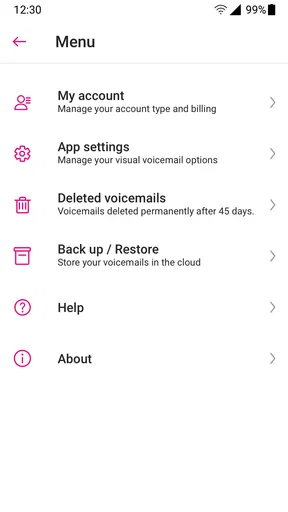
During my time using the app, I found it to be pretty reliable. Voicemails synced quickly, and I didn’t experience any crashes or bugs. The app’s interface is clean and intuitive, making navigation a breeze. Performance-wise, it’s solid, and I didn’t notice any lag or delay.
What Could Be Better?
While the app is impressive, there are a few areas for improvement. The transcription feature, as mentioned, isn't perfect. Misinterpretations can happen, which could be frustrating if you rely heavily on text accuracy. Also, it’s exclusive to T-Mobile users, so if you’re with another carrier, you’re out of luck.
Another small gripe is that the app doesn’t support voicemail forwarding to other numbers. This might be a feature some users miss, especially those who need to redirect calls frequently.
Final Thoughts
All in all, T-Mobile Visual Voicemail is a fantastic app for anyone looking to manage their voicemails more efficiently. It brings voicemail into the modern age with its easy-to-use interface and handy features like transcription and sharing. While it’s not without its flaws, the convenience it offers makes it a worthy download for T-Mobile users.
So, if you're tired of the old-school voicemail system and want something more adaptable to your busy life, give it a try. You might just wonder how you ever lived without it!
Verdict
Strengths of T-Mobile Visual Voicemail
- Easy setup with intuitive interface.
- Transcribes voicemails accurately.
- Allows message organization.
- Integrates with contacts seamlessly.
- Supports multiple languages.
Limitations of T-Mobile Visual Voicemail
- Requires a stable internet connection.
- Limited customization options.
- Ads can be intrusive at times.
- Occasional transcription errors.
- Some features need premium plan.
Other Releases by T-Mobile USA
View All
T-Life
Lifestyle4.6

Protection 360®
Business4.4

T-Mobile® FamilyMode™
Parenting4.4

T-Mobile Prepaid eSIM
Communication3.5
Similar Picks in This Category
View All
Google Messages
Google LLC4.6

Gmail
Google LLC4.1

Google Meet
Google LLC4.4

Google Chrome
Google LLC4.1

WhatsApp Messenger
WhatsApp LLC4.6

Carrier Services
Google LLC4.2
Frequently Asked Questions
What is T-Mobile Visual Voicemail and how does it work?
T-Mobile Visual Voicemail is an app that allows you to manage your voicemails more efficiently by displaying them visually on your device. Instead of dialing into a voicemail service, you can see a list of your messages and choose which ones to listen to, delete, or save. This makes it easier to manage your messages without listening to each one in sequence.
Is T-Mobile Visual Voicemail free to use?
Yes, T-Mobile Visual Voicemail is free for T-Mobile customers. There are no additional charges for using the basic features of the app. However, if you want to use advanced features like transcription services, there might be additional costs. It's best to check with T-Mobile for any potential fees associated with premium features.
Which devices are compatible with T-Mobile Visual Voicemail?
T-Mobile Visual Voicemail is compatible with most Android and iOS devices. However, to ensure full functionality, you should have a device with the latest operating system updates. Compatibility may vary based on the model and software version, so it's advisable to verify compatibility through the app store or T-Mobile's website.
How do I set up T-Mobile Visual Voicemail on my device?
Setting up T-Mobile Visual Voicemail is straightforward. Download the app from the Google Play Store or Apple App Store, then follow the on-screen instructions to complete the setup. You may need to enter your T-Mobile account credentials and grant necessary permissions for the app to function optimally. Once installed, all your voicemails will be available in the app.
What should I do if T-Mobile Visual Voicemail isn’t working properly?
If you're experiencing issues with T-Mobile Visual Voicemail, try restarting your device, ensuring your network connection is stable, or updating the app to the latest version. If problems persist, you may want to clear the app cache or reinstall the app. For further assistance, contacting T-Mobile customer support can provide more specific troubleshooting steps.
